Open-source compatibility layer

Mac and Windows games on an iPad. Unmodified.

Tolkara runs the original Mac game natively on the iPad's Apple silicon and translates its macOS calls into iPadOS ones. Windows games come along through Wine and FEX. Nothing is ported, patched or re-signed.

You build it yourself: setup needs a Mac and a paid Apple developer membership. Tested mainly on an iPad Pro (M5), and only a few games run so far.

Watch gameplay, 6 min
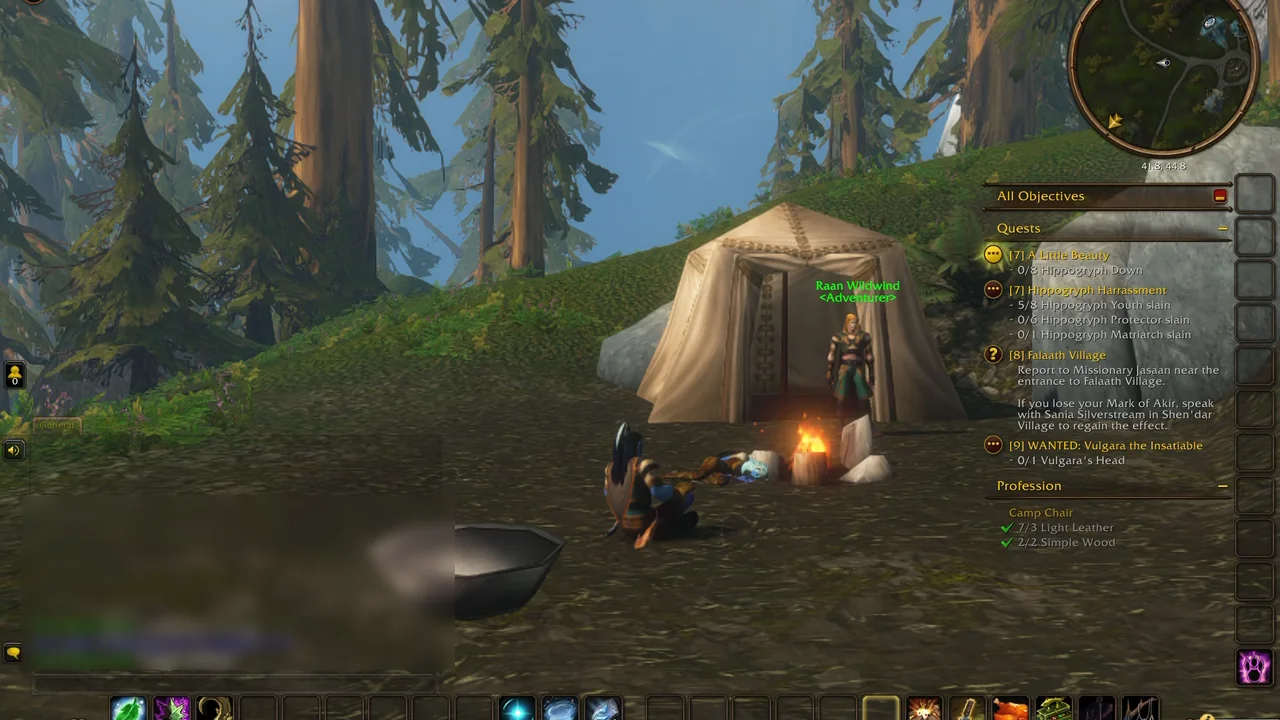
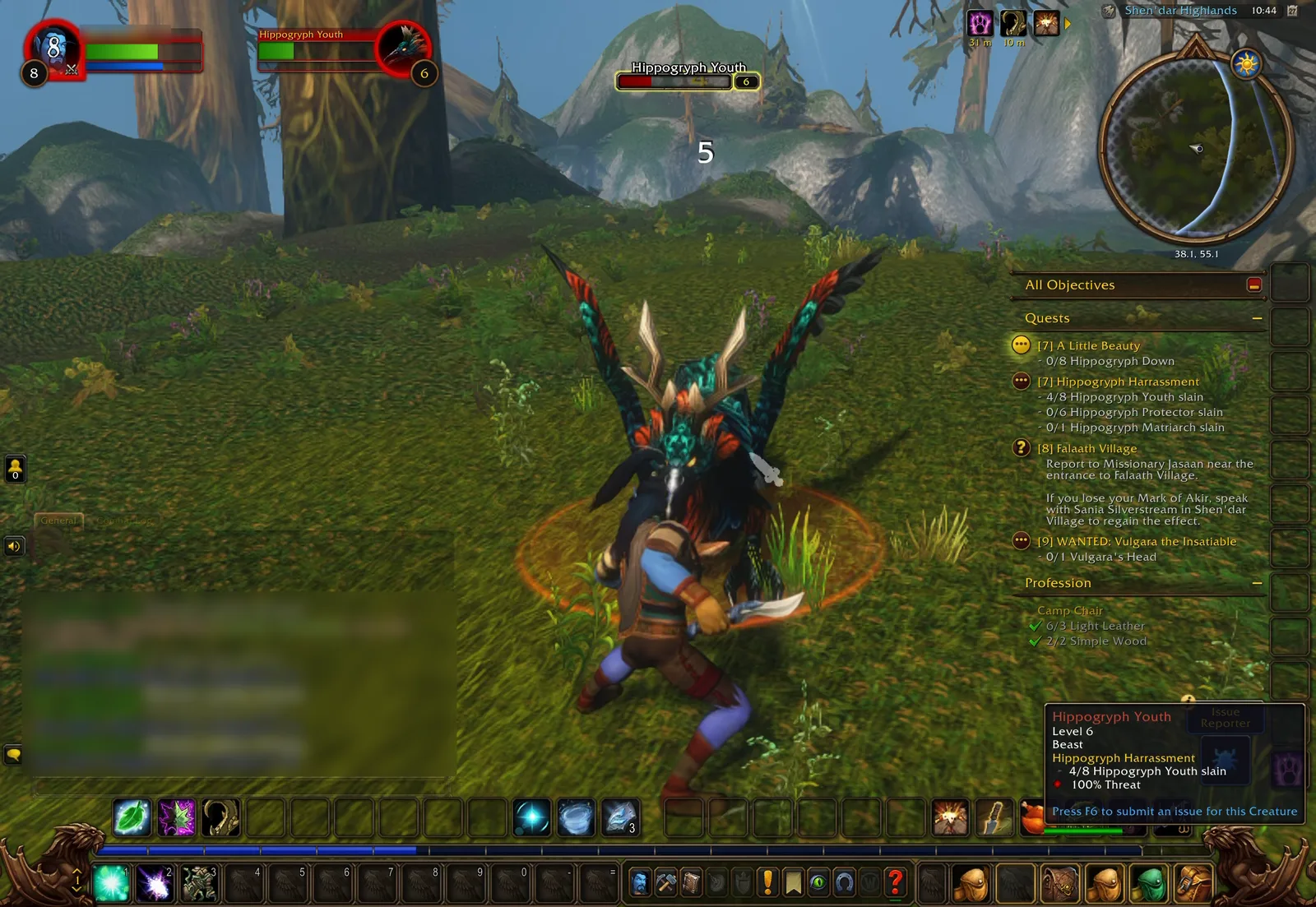
World of Warcraft Forever running on an iPad Pro: a character fights a hippogryph in a forest, with the game's full interface on screen.

World of Warcraft Forever on an iPad Pro (M5), graphics quality 8.

  • 120 FPSpeak in World of Warcraft Classic on an iPad Pro (M5), graphics quality 8 at 50% render scale
  • 8.5 sfrom tap to game for WoW Forever with Local signing
  • 3 layersWine, FEX and Tolkara carry Heroes III, a 32-bit Windows game from 1999
  • 0 bytesof the game's executable are changed. It is verified by SHA-256 and loaded as data

What runs today

Games tested so far

Everything here runs on a physical iPad, not in a simulator, and every entry comes with its known problems. Tolkara is young: a handful of applications work, and others will need more of the macOS API covered.

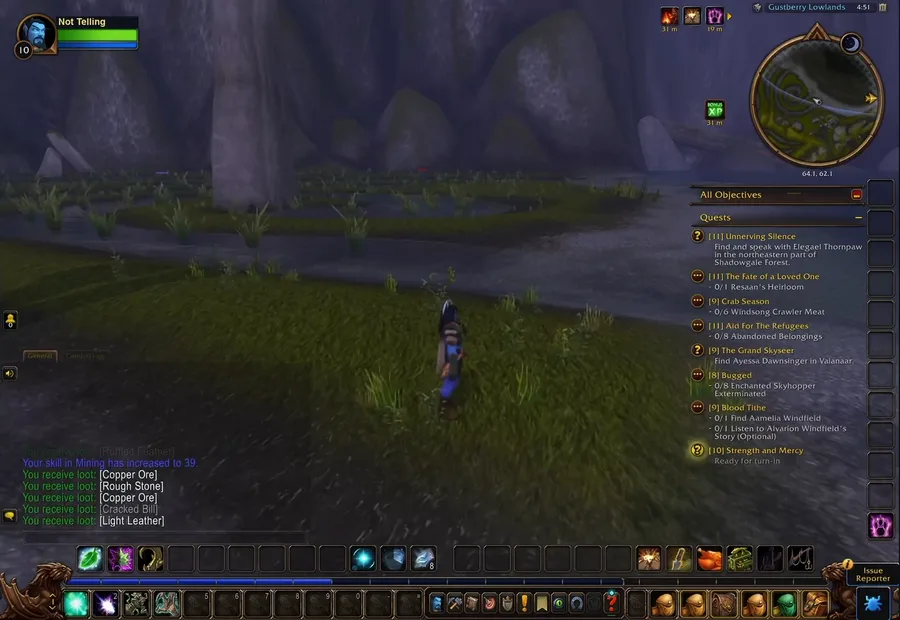
World of Warcraft Forever on iPad: a character stands by a marsh at dusk, quest log and action bars on screen.
Playable

World of Warcraft Classic & Forever

The macOS clients log in and play: world, combat, quests, trading, audio and cinematics. Classic Era reaches 120 FPS at reduced resolution. Forever holds 59 to 72 FPS at graphics quality 8, by the game's own readout.
macOS arm64 · iPad Pro M5 · Developer service or Local signing

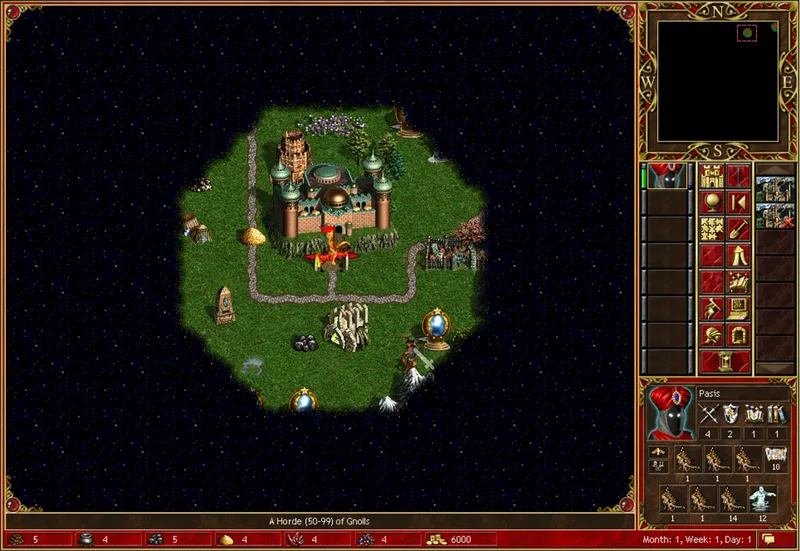
Heroes of Might and Magic III on iPad: a battle on the hex grid.
Playable

Heroes of Might and Magic III: Horn of the Abyss

The original Windows game with the HD mod. Adventure map, towns, battles, AI turns with up to eight players, saving and loading, music, mouse and keyboard all work. Performance has not been measured.

Windows x86 (GOG) · Wine + FEX · iPad Pro M5 · Developer service

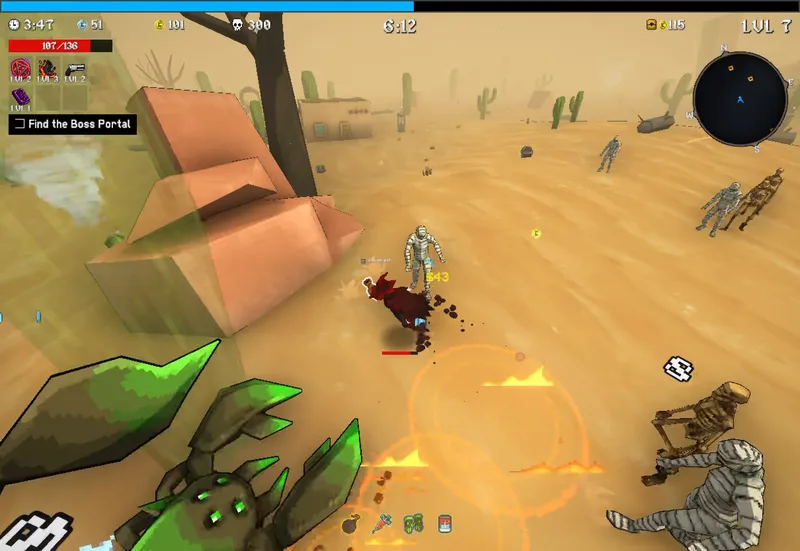
MegaBonk on iPad: the player's character in a desert stage, surrounded by mummies, skeletons and giant scorpions.
Playable

MegaBonk

A 64-bit Windows game from Steam. Whole stages play through, boss fights included. Saves synchronise with Steam Cloud in both directions, so progress made on a PC carries over. Performance has not been measured.

Windows x86-64 (Steam) · Wine + FEX + DXVK · iPad Pro M5

Experimental

Steam for Windows

The Steam client updates itself, signs in and opens the library. Games download and start from it; Vampire Survivors plays this way. Start-up takes about five minutes and popups have rendering problems.

Windows · opt-in software-memory mode

Not playable

Cyberpunk 2077

The macOS version loads its archives, scripts and shader caches and renders the opening cinematic at about one frame per second. Its memory demands are the hard part.

macOS arm64 (GOG) · opt-in software-memory mode

Full compatibility list, with devices and known problems

How it works

How Mac and Windows games run

Tolkara has the shape of Wine. macOS and iPadOS share a CPU architecture, a kernel, an Objective-C runtime and most low-level frameworks. So a Mac program needs no emulation on an iPad, only a loader and a translation of the parts that differ: process loading, executable memory, the desktop UI frameworks and the shader format.

A Mac game

Its arm64 code runs directly on the iPad's processor.

  1. Original macOS executableImported as a file. Never edited or re-signed.
  2. Tolkara runtimeA Mach-O loader: maps the image, applies rebases and binds as dyld would, sets up thread-local storage and Objective-C metadata, then enters the original main.
  3. Tolkara translationAppKit on UIKit, Metal device and shader adaptation, CoreAudio, Carbon keyboard, CoreGraphics displays, Security.
  4. iPadOSUIKit, Metal, AVFAudio, Security and the rest of the real system frameworks.

A Windows game

The same pairing Valve ships as Proton for ARM64, with Tolkara underneath.

  1. Original Windows programx86 or x86-64, unchanged.
  2. Wine + FEXWine implements the Windows API on the macOS one. FEX translates x86 instructions to arm64 as the game runs. Direct3D games go through DXVK and MoltenVK.
  3. TolkaraWine for macOS is itself an unmodified arm64 Mac program, so Tolkara loads it like any other.
  4. iPadOSUIKit, Metal and the other iPadOS frameworks.

Read the architecture notes

Executable memory

Three ways to run code

iPadOS executes only code whose pages carry a valid signature, with one exception for development: memory that a debugger has prepared. Tolkara supports three routes within those rules. You choose one on first launch and can change it later.

Most tested

Developer service

A packet-tunnel extension bundled with Tolkara reaches the iPad's own developer service, which prepares executable memory and detaches before any application code runs.

Needs
Developer Mode, a one-time enrolment from a Mac, and permission for Tolkara's own VPN-style tunnel.
Trade-off
Preparation at every launch, about 3 MB per second: 33 seconds for Heroes III.
Application code
Runs unchanged. Nothing of it is ever signed.
Fastest start

Local signing

The application's final code pages go into a small library, a page container, signed with your own developer identity. iPadOS validates it and Tolkara maps those pages into place.

Needs
Developer Mode and your developer identity. The container is built and signed on a Mac.
Trade-off
No debugger, tunnel or wait. Cannot run code generated at run time, so no Windows games.
Application code
The executable is unchanged. A derived, signed copy of its code pages stays on your devices.
Untested: not yet run on a device

External JIT

You sideload an unsigned build, for example with SideStore, and open it with a JIT enabler such as StikDebug. The enabler prepares memory and is asked to detach.

Needs
Developer Mode, a sideloading tool and a JIT enabler. A free Apple ID can sign the app.
Trade-off
Free signing drops the increased-memory capabilities, so large applications may not fit.
Application code
Runs unchanged. Nothing of it is ever signed.

Get started

Build and install with the Mac setup app

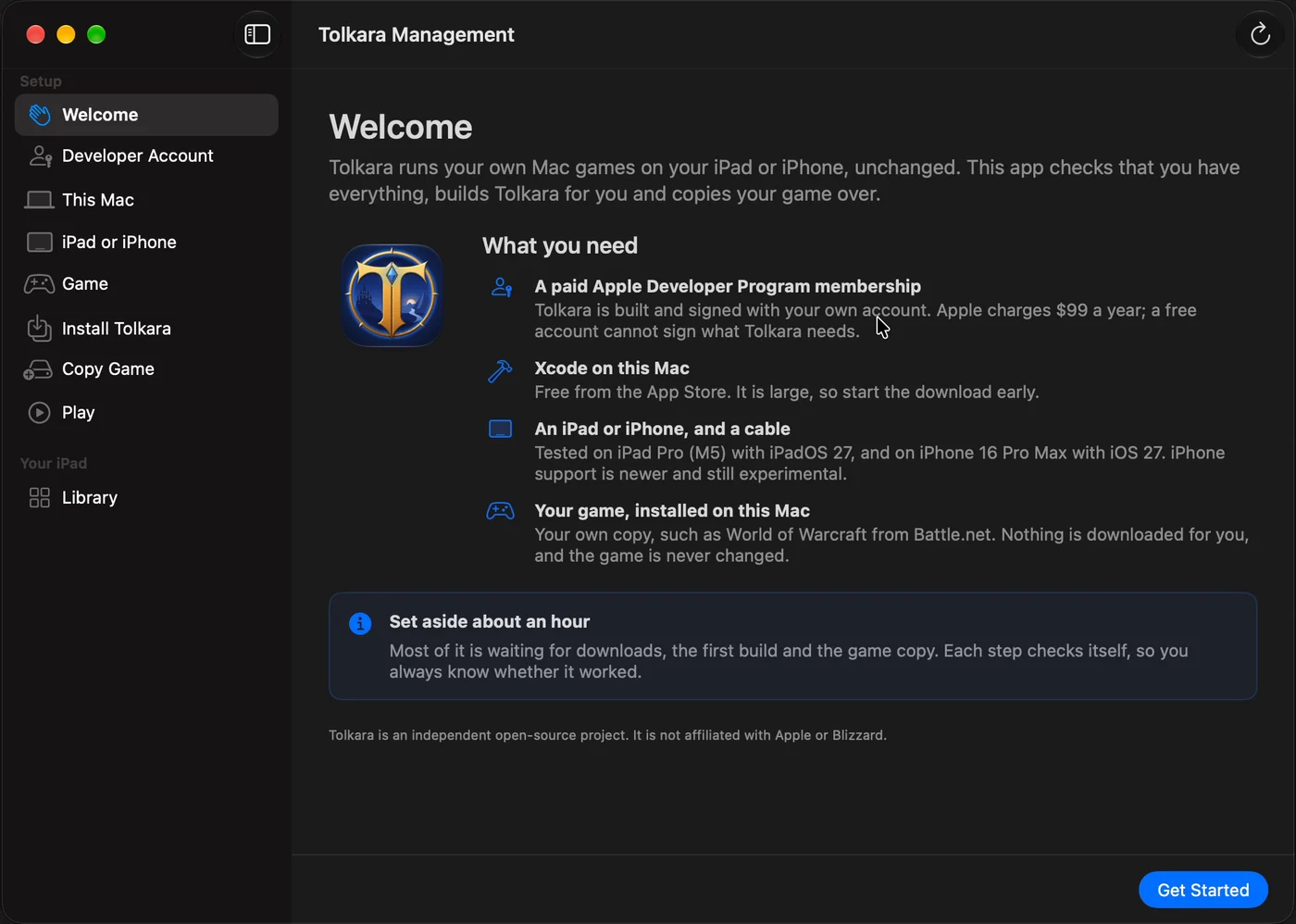
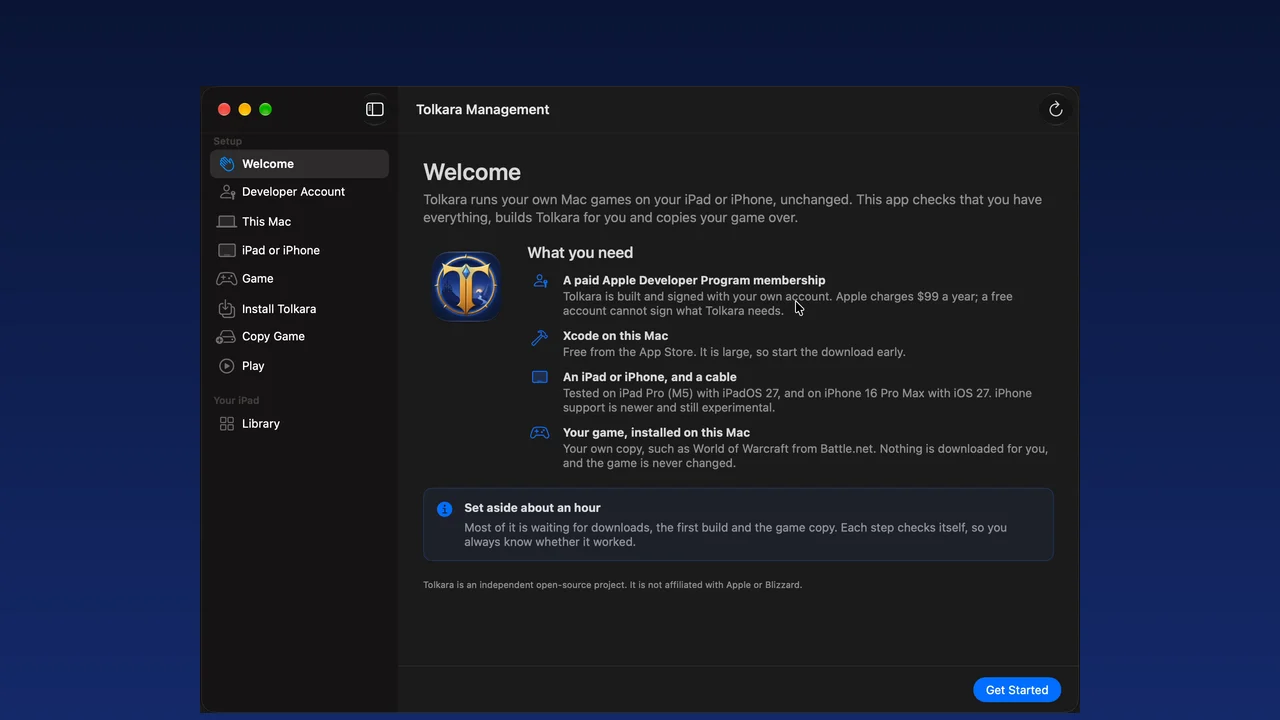
Tolkara is a do-it-yourself developer project. It is compiled on your Mac, signed with your own Apple developer account and installed on your own device. Tolkara Management, a Mac app, walks you through every step and checks each one. Set aside about an hour, most of it waiting for downloads and the first build.

What you need

  • A Mac with a recent Xcode
  • A paid Apple Developer Program membership. Free teams cannot sign the capabilities Tolkara needs
  • An Apple-silicon iPad. Testing so far is on an iPad Pro (M5) with iPadOS 27; iPhone support is experimental
  • Your own, legally obtained copy of the game
  • A keyboard and a trackpad or mouse are recommended

Playing an online game this way can put your account at risk. Read the account-risk notice first.

Tolkara Management on a Mac: a Welcome page listing what you need, with setup steps in the sidebar from Developer Account to Play.
What the setup app does, step by step
  1. Developer accountChecks for a paid Apple Developer Program membership, using what Xcode already keeps on your Mac. No credentials are asked for.
  2. This MacXcode, XcodeGen, Python 3 and free space. Missing tools are installed for you.
  3. iPad or iPhoneConnected, trusted, Developer Mode on.
  4. GamePick a profile, such as WoW Forever. The app finds your copy and shows the account-risk notice.
  5. Install TolkaraBuilds for your team and device, installs, and enrols for Developer service.
  6. Copy gameCopies the game's files to the device. Never an account name or password.
  7. PlayOpen Tolkara on the device and tap the game. After enrolment it launches without the Mac, also after a reboot.

Or by hand

The same scripts the setup app runs, from a clone:

Terminal
git clone https://github.com/tolkara/tolkara.git
cd tolkara
cp local.env.example local.env   # your team, bundle ID, device
tools/install.sh
tools/enroll.sh   # once, for Developer service

Full building guide

See it

On the device

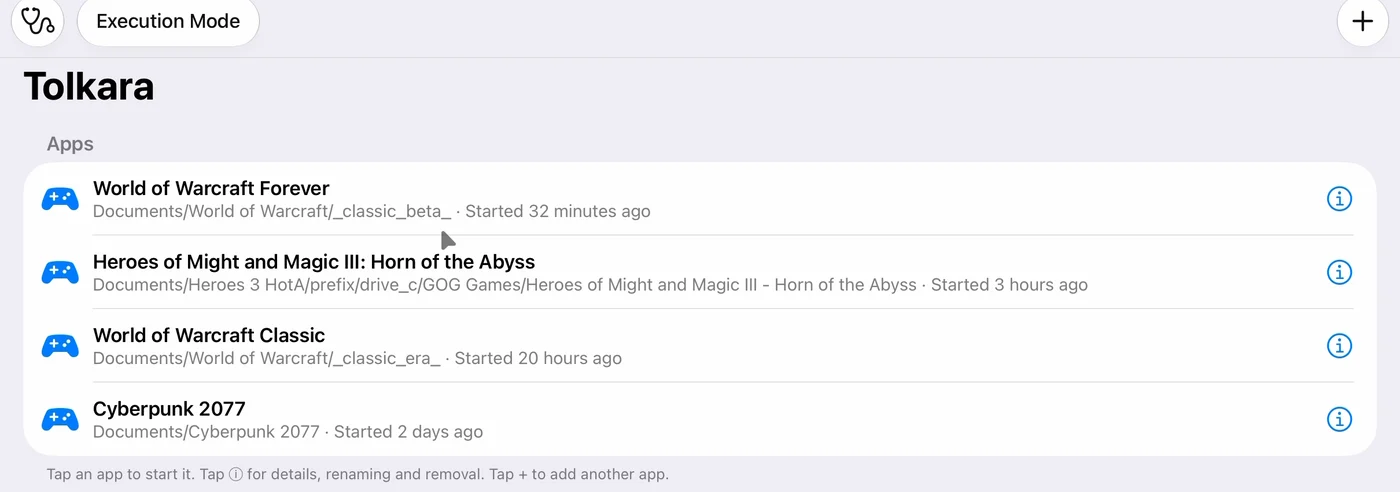
The Tolkara app library on iPad: an Execution Mode button above a list of World of Warcraft Forever, Heroes of Might and Magic III, World of Warcraft Classic and Cyberpunk 2077.

One app, a library of games

Tolkara on the iPad is a plain library. Each game is described by a small profile, a data file with its name and where its files live. Tap a game to start it. The Execution Mode button switches between the three modes.

A profile holds no code. New ones can be added from a file or a link, and contributed back for everyone.

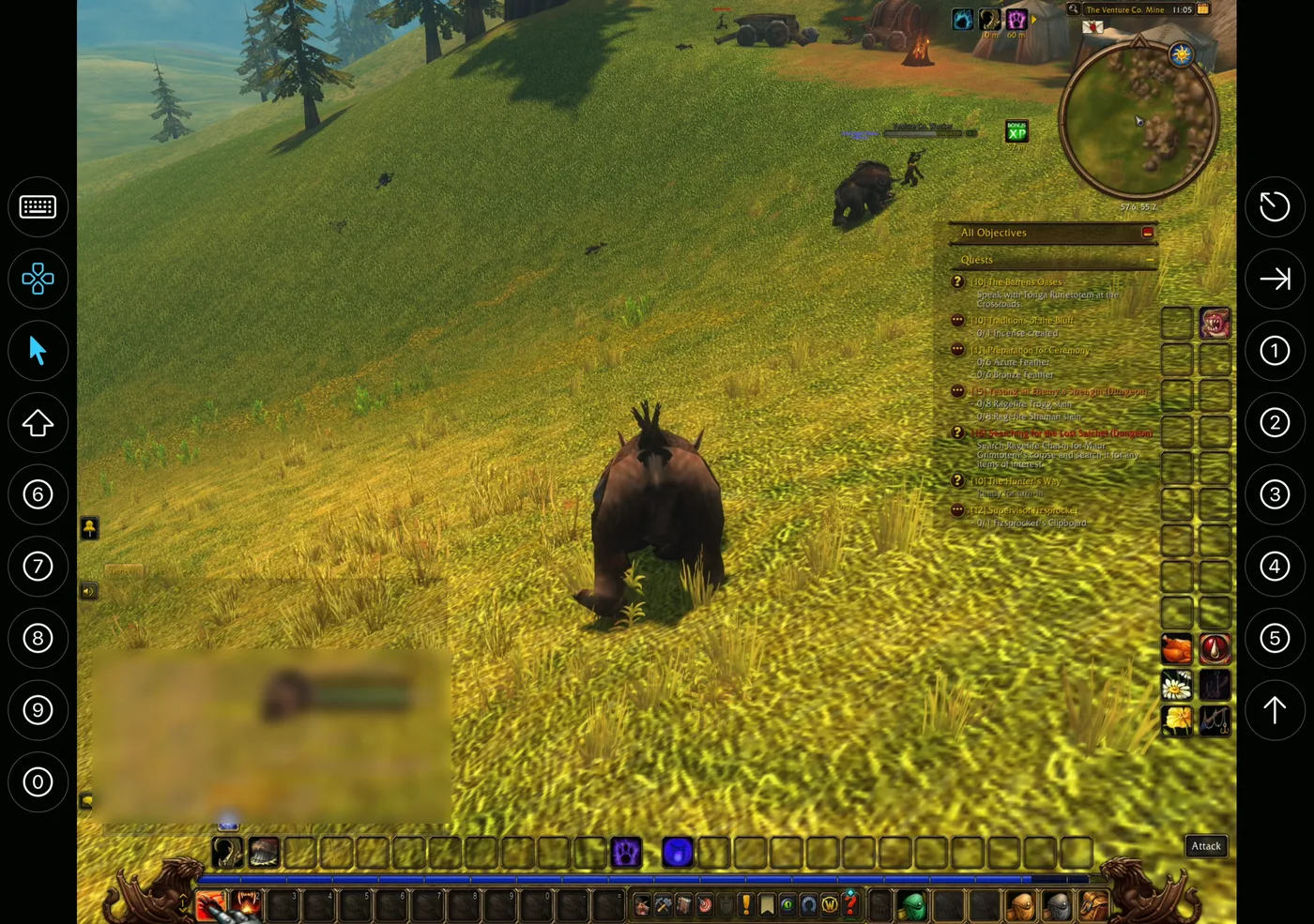
World of Warcraft on an unfolded iPhone Duo with Tolkara's on-screen controls in columns at both edges: keyboard, movement stick, pointer, Shift, number keys, Escape, Tab and Jump.

On-screen controls when there is no keyboard

Optional controls stand in for a keyboard and mouse: a movement stick, a touch trackpad in the manner of a remote-desktop pointer, a Jump button and the iOS keyboard. They are on by default on iPhone and off on iPad.

On an unfolded iPhone Duo they sit in columns beside the game, with number keys, Escape and Tab. iPhone support is experimental.

Video

Watch

World of Warcraft Forever on iPad Pro M560 FPS on graphics quality 8, with the game's own framerate readout on screen. 6 minutes.
How to install WoW Forever on iPadTolkara Management from a fresh Mac to a running game. 9 minutes.

Videos load from YouTube only when you press play. More on the Tolkara channel.

Principles

What Tolkara does to a game

Tolkara loads the original executable and translates system calls. These are the limits it keeps, and the source is open to check them.

The executable is never modified

It is imported as a file, verified by SHA-256 and mapped into memory. It is never edited, re-signed or included in the app bundle. Rebases and binds are runtime state in memory, as with dyld.

A short, fixed list of intercepted calls

The loader answers a few calls itself because they concern how the image was loaded, such as mmap, mprotect, dlsym and _NSGetExecutablePath. The whole list is in one source file.

Everything else is the real system, or a logged stub

Imports resolve to an iPadOS framework, a translation library, or a library the application carries. One that nothing provides becomes a stub that logs and returns zero.

Nothing is hidden from the application

Tolkara does not conceal debuggers, processes, the device model or the operating system. The debugger that prepares memory detaches before the first application instruction runs, and nothing attaches afterwards.

The project will not accept

  • Reading or changing an application's memory for any purpose other than loading it: no trainers, overlays, bots or input automation.
  • Workarounds for anti-cheat, licence or integrity checks.
  • Bundled or downloadable copies of any third-party application, asset or operating-system component.

Online games and account risk

Tolkara is not supported, endorsed or approved by the publisher of any application you run with it. Running a game client on an operating system it was not released for may be against that game's terms of service.

Blizzard has for many years tolerated players who run its games on Linux through Wine and Proton. Tolkara is built the same way and for the same purpose. That history is not a promise: automated detection can misfire, and a publisher can change its position at any time.

If you use Tolkara with an online account, the risk of a suspension or ban is real and it is entirely yours. If that risk is not acceptable to you, do not use Tolkara with that account.

FAQ

Frequently asked questions

Is Tolkara on the App Store?

No. You build it from source and sign it with your own developer account. Releases carry Tolkara Management, the Mac app that does the build for you, and an unsigned build for the External JIT route.

Do I need a Mac?

Yes, to build and install Tolkara, to enrol the device once, and to hold your copy of the game. After that the iPad launches games on its own, also after a reboot.

Do I need a paid Apple developer account?

For the tested routes, yes. Tolkara needs the Network Extension, increased memory limit and extended virtual addressing capabilities, which free personal teams cannot sign, and free provisioning profiles expire after seven days. External JIT is meant to work with a free Apple ID, but it has not been run on a device yet.

Is this an emulator?

For Mac applications, no. Their arm64 code runs directly on the iPad's processor, and only the operating-system calls are translated. Windows games are x86 programs, so FEX translates their instructions to arm64 while they run, inside Wine.

Which devices work?

Development and testing use an iPad Pro (M5) with iPadOS 27. iPhone support is experimental: an iPhone 16 Pro Max, an iPhone 15 Plus and an unfolded iPhone Duo have run World of Warcraft. The compatibility list says what was tested where.

Does Tolkara include any games?

No. The repository and the releases contain no third-party application code or assets. You bring a copy you have the right to use.

Why does a game take a while to start?

With Developer service, executable memory is prepared at every launch at about 3 MB per second, and Tolkara has to stay in the foreground meanwhile. Local signing has no such wait, but it works only for programs whose code is fixed before they run.

Can I play with touch only?

There are optional on-screen controls, and World of Warcraft has been played with them alone on an iPhone Duo. Desktop games are designed for a keyboard and a pointer, though, and that is how they play best.

What are Wolkara and WolkaraForever?

Independent community forks of Tolkara that focus on World of Warcraft. They are maintained by other people. This site and the tolkara/tolkara repository are the original project.

My application does not start. What now?

That is expected for most applications today: each one touches parts of the macOS API that may not be translated yet. Reports and patches are welcome in the issue tracker. Results, including failures, belong in the compatibility list.

Open source, and looking for test results

Tolkara is MIT licensed and developed in the open. Try your game and report what happens: compatibility reports are as welcome as patches.